Twitter RSS Feed
Showing posts with label Tricks. Show all posts

Free Google Search and more on Mobile and PC

Google India

If you are a subscriber of Airtel mobile and got a GPRS enabled phone then you are eligible to browse and use http://www.google.co.in for free. You can also connect your phone as modem and browse Google India in PC. All you need is the Opera browser, since Airtel is blocking other browser user-agents to access their service. The handset settings to browse this service is same as Airtel Live settings.

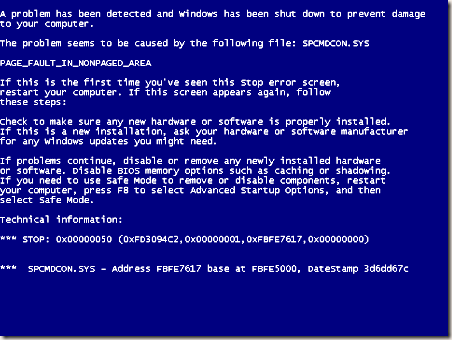
Blue Screen of Death – get it on your PC


The famous Blue Screen of Death (BSoD) or STOP error is a critical system error, which prevents your PC to boot into Windows and displays an error message like the above one.

Now you can get this error as a screen saver and use it to amaze your friends and scare your enemies!

Get BSoD

PookMail.com - disposable email account for Easy and Anonymous e-mail


PookMail.com       

PookMail.com provides free and anonymous disposable email service.

Where anyone can create an email account @pookmail.com (e.g. xyz@pookmail.com) and then use it to receive emails and reply to received emails. User cannot send an email from his PookMail.com account to any email address or cannot compose new emails to be sent. I think this is done to stop PookMail.com users to spam or abuse PookMail.com services. Users just have to enter their username to log in or create a new account at PookMail.com (i.e. No password protection). You can receive your PookMail.com emails directly to your desktop via RSS feed.


i.e.

http://www.pookmail.com/rss/email_account.xml 


PookMail.com is like a disposable inbox because your account will deleted after 24 hours with all stored emails. So you must save important emails before that time.


So why use PookMail.com?


PookMail.com service is quite useful when you have to give your email id you unknown persons or web sites whom you don’t trust for spam or other reasons.

View/Recover User Ids, Passwords, Product Keys - Saved in your PC

A nice set of software tools provided by Nir Sofer can help you to view or recover your user ids and passwords stored in Internet Explorer, Outlook, Thunderbird, Instant Messengers like MSN, Gtalk, Yahoo! (5.x and 6.x versions only) etc. You can also extract user info like product key and Id of Windows, MS Office, Exchange Server and SQL Server installed in your PC. 

Mail PassView: The tool needed to view or recover Email client software (Outlook, Thunderbird etc) stored ids and passwords.

To view/recover ids and passwords stored in a IM client (Gtalk, Yahoo!, MSN etc) you can use MessenPass.

To view/recover product keys and Ids you can use ProduKey.

To view/recover Internet Explorer Stored id and passwords you need IE PassView.

You can download these and lots of other id password recovery tools like these from www.nirsoft.net.

*Note: These tools don't contain any trojan/virus and these are not hack tools which can send recovered ids and passwords over Internet. Some anti-virus programs may detect these tools as virus or hack tools, you can ignore these warnings.