Twitter RSS Feed
Showing posts with label Freeware. Show all posts

ginipic - Search Photos Online and Offline Simultaneously

ginipic - Search Photos Online and Offline Simultaneously 


Search images from all possible sources you may think of using ginipic. Ginipic offers photo searching from multiple sources like Photo Sharing sites(Flickr, Photobucket, Picasa), Online Image Search Engines(Google, Yahoo, Bing), Stock photos(Fotolia, Dreamstime, Crestock) and local pictures stored in your computer simultaneously.

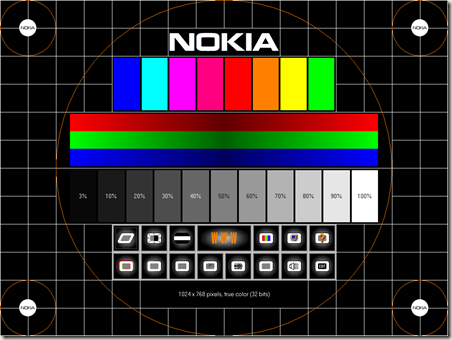
Nokia Monitor Test - Tweak your monitor and get sharpest possible display


Nokia_test_splash

Nokia Monitor Test the ultimate monitor calibration tool to tweak any type monitors and have the best possible display configuration. This tool supports adjustment of brightness, contrast, geometry (width, height, Tilt etc), color, readability etc.

It also got a little option for testing system sound configuration.


Nokia_test

Nokia Monitor Test is no longer supported by Nokia and future development have been stopped, the final version is 1.0.0.1


Technorati Tags: ,

EyeDefender – avoid eyestrain and prevent Computer Vision Syndrome


EyeDefender is a freeware which can protect your eyes from Computer Vision Syndrome (CVS).


CVS is a temporary condition resulting from focusing the eyes on a computer display for protracted, uninterrupted periods of time. Symptoms of CVS include headaches, blurred vision, neck pain, fatigue, eye strain, dry, irritated eyes and difficulty refocusing the eyes. These symptoms can be further aggravated by improper lighting conditions (i.e. bright overhead lighting or glare) or air moving past the eyes (e.g. overhead vents, direct air from a fan).


“EyeDefender can also help you prevent other problems related to computer use, which require a computer user to take short breaks. These problems include Carpal Tunnel Syndrome (CTS) or Occupational Overuse Syndrome (OOS), also known in the USA as Repetitive Strain Injury (RSI) and in Europe - Musculoskeletal Disorders (MSD).”


EyeDefender runs automatically in the system tray and guides a computer user to take a break, when it’s really needed to protect your eyes from CVS.


I think EyeDefender is very useful software because nowadays many hardcore computer users (including me) often face these problems, though EyeDefender is only available for Windows based PCs.

Blue Screen of Death – get it on your PC


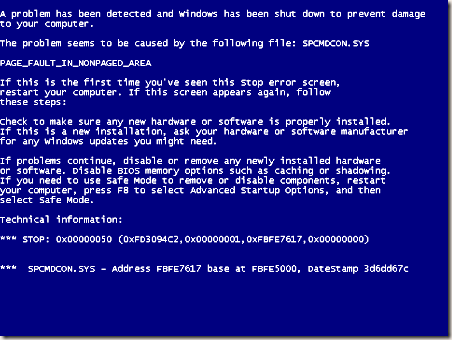
The famous Blue Screen of Death (BSoD) or STOP error is a critical system error, which prevents your PC to boot into Windows and displays an error message like the above one.

Now you can get this error as a screen saver and use it to amaze your friends and scare your enemies!

Get BSoD

BitThief – cheat BitTorrent, Steal Every Bit without uploading


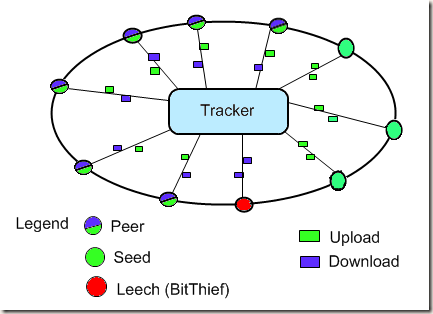
bittorrent_BitThief


BitThief is a BitTorrent client developed by Distributed Computing Group at ETH Zurich, it offers torrent downloads without uploading (seeding). Its simply cheats the BitTorrent protocol, allowing it's users to download like a selfish giant. You may get better download speed with BitThief on well seeded torrents and slow internet connection (you will be able to use your full bandwidth for download), though just imagine if everybody starts using BitThief then the torrent itself will be dead.


BitThief poses a great threat to BitTorrent Peer 2 Peer (P2P) file sharing and can be considered as a torrent leeching client software. The point raised by the developers of BitThief is “We argue that the BitTorrent protocol has to be modified in order to effectively prevent selfishness.”


BitTyrant another torrent client similar to BitThief, though BitTyrant do seed, but only to the peers having high upload speeds.

Download BitThief


To use BitThief you must have Java Runtime Environment (JRE) installed, because BitThief is Cross-platform and written in Java.


Get latest version of Java Runtime Environment (JRE).

ZSoft Uninstaller - Uninstall programs with ease

ZSoft_Splash 

Do you ever faced, that you’re unable to uninstall certain programs from Windows Add or Remove Programs options? Or you have uninstalled the program though it’s uninstall entry is still present in Add or Remove Programs.

The main causes of these errors are damaged installations or software bugs in the programs.

Many of us have faced these problems. There is one easy solution available to this problem, ZSoft Uninstaller allows you to easily uninstall programs and works as an alternative to Windows Add or Remove Programs option. You can also delete left over uninstall entries using this program.

If you are unable to uninstall a program, then just manually delete the files of that program from your HDD (generally from C:\Program Files) and then use Zsoft Uninstaller to remove the uninstall entry.


The main features or ZSoft Uninstaller are following:


  • Search (search the list of installed software)
  • Delete entry's from programs that is no longer installed
  • Automatically find entry's from programs that are most likely already uninstalled
  • Hide entries from the list that you are never going to uninstall (Windows updates etc.) making the list smaller and therefore easier to manage.
  • Automatically find entry's that are considered "crap-ware"
  • Export the current list to a TXT file
  • Show more information than available though add/remove
  • Find and delete temporary files
  • Analyse an installation so it can be completely uninstalled


    Click here to download ZSoft Unistaller for free.


    Click here to view ZSoft homepage (incase the above link changed/dead or you want to try other programs from ZSoft).

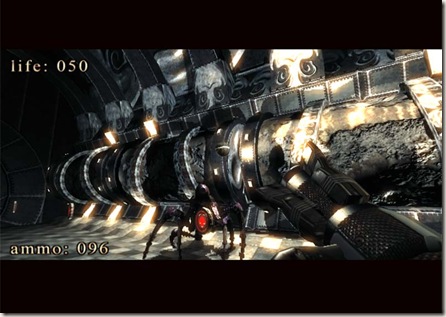
  • .kkrieger the 96K free first person shooter game

    .kkrieger screenshot 

    .kkrieger is just 96KB in file size, though its a good and free alternative to other first person shooter games like Serious Sam which eats lots of MBs of your hard disk space. But you still need a good graphics card with at least pixel shaders 1.3 and 128 MB VRAM, 512MB or more RAM, 1.5Ghz Pentium3/Athlon or faster processor, DirectX 9.0b.

    Click here to download .kkrieger and play it yourself.

    Libra - organize your stuff, beautifully

    Libra_Screen_Shot

    Libra is a new and innovative library management software for Microsoft Windows. Though it’s still in beta mode but the software is pretty much powerful and user-friendly to manage your media library. It has the ability to download media information and album arts from Amazon.com database and you can add media using search from Amazon.com database or by manual input, you can also import your previous library database directly into Libra (Delicious Library, Library Thing, Generic Excel (v2003 and above)/Text files, DVD Profiler v3) . It features a webcam barcode scanner, which allows you to use your webcam as a barcode scanner, by using this feature you can add media to Libra automatically by pointing your webcam to the barcode of your media. It also supports using of regular barcode scanners. Using Libra you can track who borrowed your media and what's the check out date, due date etc. You can export your Libra database to Web Export, Excel Export or in text CSV format.

    The most interesting thing about Libra is that it is a freeware for non-commercial use.

    Download Libra and give it a try.